先上代码 RenderWebViewWithNative 我只在模拟器环境中测了。
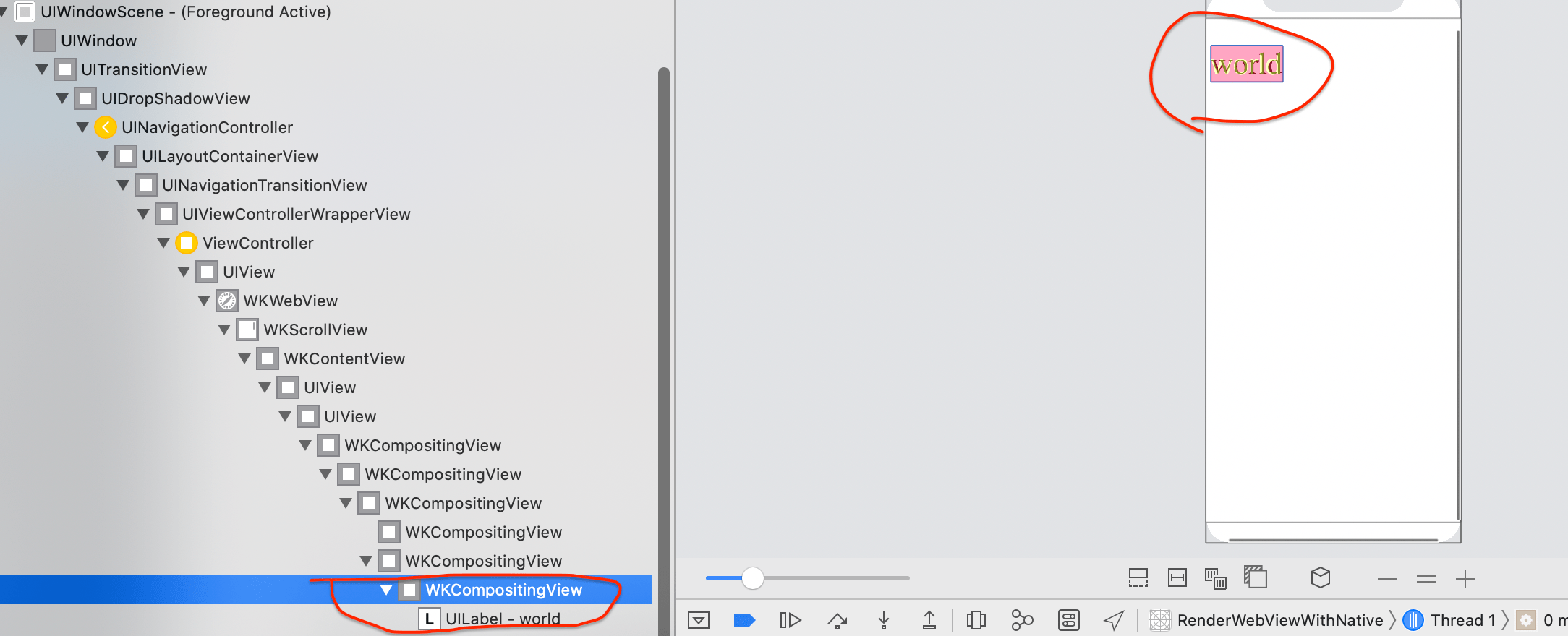
本文成文使用的环境
- Xcode Version 11.3 (11C29)
- 模拟器版本Version 11.3 (SimulatorApp-912.5 SimulatorKit-570.3 CoreSimulator-681.17),对应iOS 13.2
同层渲染步骤
简单说下同层渲染效果,是将Native控件添加到WKWebView的子层级View中,最明显的是z-index 属性可以控制Native控件。详细请阅读https://developers.weixin.qq.com/community/develop/article/doc/000c4e433707c072c1793e56f5c813
需要前端改造的地方
为了让WKWebView为Native控件单独生成一个子层级的View,需要改变对应DOM节点的CSS样式,如
〈div style="position: fixed; font-size: 50px;overflow: scroll;-webkit-overflow-scrolling: touch" id="zl_native" 〉
            〈zl-native id="zl_native_node"〉world〈zl-native〉
〈/div〉
本文成文环境中测试的结果是:
-
WKWebView只为
position: fixed的 标签内容生成单独的子层级视图 -
overflow: scroll;-webkit-overflow-scrolling: touch,在本文成文环境中不起作用;建议读者自行尝试更多的环境,以得到更准确的结论。
需要客户端改造的地方
首先,当前端加载DOM时,检测到需要Native渲染的节点,需要通过jsbridge通知客户端,把节点的信息告诉客户端。客户端根据节点信息找到对应的子层级view
-(UIView *)find_zl_native_view
{
    UIView *wkcontentview = [self get_wkcontentView];
    NSMutableArray *arr = [wkcontentview.subviews mutableCopy];
    while (arr.count > 0)
    {
        UIView *comp = arr.firstObject;
        [arr removeObjectAtIndex:0];
        if ([@"WKCompositingView" isEqualToString:NSStringFromClass([comp class])])
        {
            if ([comp.layer.name isEqualToString:@"
 id='zl_native'"]) {
                return comp;
            }
        }

        if (comp.subviews.count > 0)
        {
            [arr addObjectsFromArray:comp.subviews];
        }
    }
    return nil;
}
找到后,在这个子层级view上添加Native控件,渲染对应内容。
-(void)startNativeRender_zl_native_node
{
    UIView *view = [self find_zl_native_view];
    UILabel *lbl = [[UILabel alloc] initWithFrame:view.bounds];
    [view addSubview:lbl];
    lbl.alpha = 0;
    [UIView animateWithDuration:3 animations:^{
        lbl.alpha = 0.6;
        lbl.text = @"world";
        lbl.textColor = [UIColor yellowColor];
        lbl.backgroundColor = [UIColor redColor];
        lbl.font = [UIFont systemFontOfSize:49.5];
    }];
}